
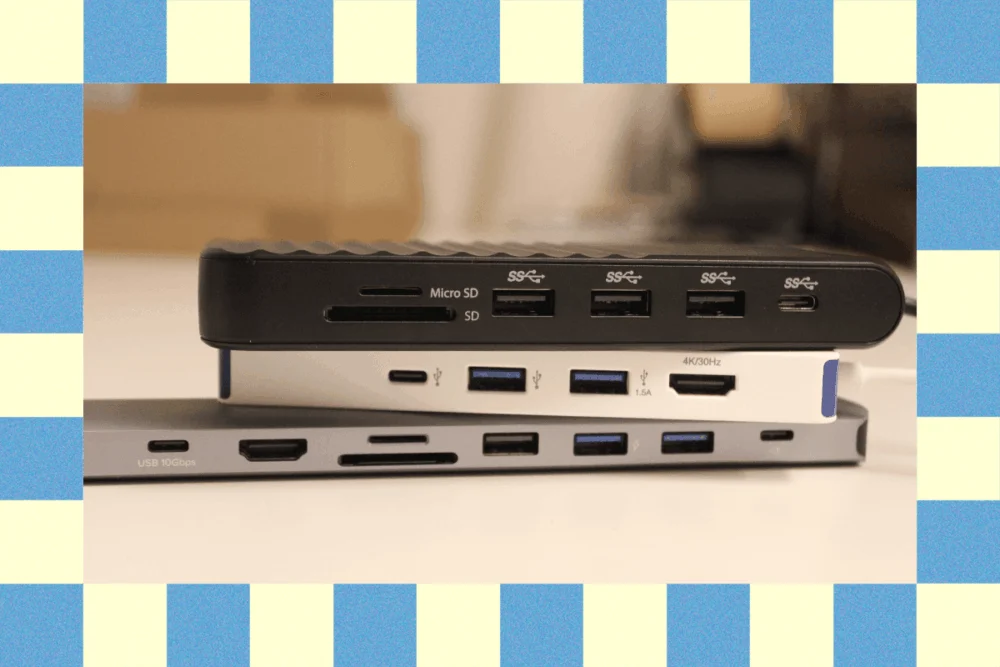
The evolution of mobile computing has prioritized portability and aesthetics, often at the expense of physical connectivity. As of early 2026, the industry standard for laptops, led by flagship models like the MacBook Air and Dell XPS 13, has moved almost exclusively toward a minimal array of USB-C or Thunderbolt ports. While this transition has streamlined device design, it has created a significant "connectivity gap" for professionals, students, and creators who rely on legacy peripherals, external displays, and wired networking. The USB-C hub has consequently transitioned from a niche accessory to an essential component of the modern workstation.
The Current State of Peripheral Connectivity
In the current hardware landscape, the distinction between a portable USB hub and a stationary docking station has become increasingly critical for consumers to understand. As updated in February 2026, the market is currently saturated with a variety of multi-port adapters designed to solve specific workflow bottlenecks. A USB hub is generally defined as a compact, bus-powered device—meaning it draws power directly from the laptop—intended for mobile use. In contrast, docking stations are larger, externally powered units designed to support permanent desktop setups with multiple high-resolution monitors and high-speed storage.
The primary driver for the hub market in 2026 remains the need for "pass-through charging" via USB Power Delivery (USB-PD). This technology allows a single port on a laptop to receive power from a wall charger while simultaneously transmitting data to and from multiple connected devices. For users of modern ultrabooks, which may feature as few as two ports, this capability is not merely a convenience but a operational necessity.

Top Performers in the 2026 Market
Best Overall: Plugable USB-C 9-in-1 Hub (USBC-9IN1E)
The Plugable 9-in-1 Hub has emerged as the industry leader for the general consumer. Priced at approximately $50, it offers a balanced distribution of ports that caters to both legacy and modern needs. The device features an integrated Ethernet port, an HDMI output for external displays, and a variety of USB-A and USB-C data ports. Its reliability stems from Plugable’s history of rigorous firmware support, ensuring compatibility across Windows, macOS, and ChromeOS environments.
Best Budget Solution: Hiearcool USB-C Multi-Port Adapter
For users seeking basic connectivity without a significant financial investment, the Hiearcool 7-in-1 adapter remains a staple. At a $20 price point, it provides the essential "starter kit" of ports: two USB-A 3.0 ports, SD and microSD card slots, and an HDMI output. While it lacks the high-speed data throughput of more expensive Thunderbolt-certified hubs, it fulfills the requirements of office productivity and academic environments.
High-Resolution and Specialist Options: Satechi 8K and Hybrid Adapters
Satechi has carved a niche in the premium segment by focusing on high-bandwidth video and integrated storage. The Satechi USB-C Multiport 8K ($100) is designed for creative professionals who have transitioned to 8K monitors or high-refresh-rate 4K displays. Simultaneously, the Satechi Hybrid Multiport Adapter ($90) addresses storage limitations by including an internal slot for an M.2 SATA SSD, allowing users to expand their laptop’s storage capacity while adding peripheral ports.

A Chronology of USB Development and Naming Confusion
To understand the complexity of the current hub market, one must look at the timeline of USB standards, which has been characterized by frequent and often confusing rebrandings by the USB Implementers Forum (USB-IF).
- 2008 – USB 3.0: Introduced a maximum transfer speed of 5 Gbps.
- 2013 – USB 3.1: Doubled speeds to 10 Gbps. However, the original USB 3.0 was retroactively renamed "USB 3.1 Gen 1," while the new standard became "USB 3.1 Gen 2."
- 2019 – USB 3.2: Further increased speeds to 20 Gbps (Gen 2×2). In another rebranding cycle, the 5 Gbps and 10 Gbps standards were renamed again to "USB 3.2 Gen 1" and "USB 3.2 Gen 2."
- 2022-2024 – USB4 and Thunderbolt 4: These standards unified the connector shape (USB-C) and mandated higher minimum data speeds (40 Gbps) and dual 4K display support.
- 2025-2026 – Thunderbolt 5: The most recent leap, offering up to 80 Gbps of bi-directional bandwidth and up to 120 Gbps for video-intensive tasks.
Because of this convoluted history, many reputable manufacturers in 2026 have moved away from using version numbers on their packaging, instead opting to print the literal maximum speed (e.g., "10 Gbps") directly onto the device chassis to aid consumer transparency.
Technical Specifications: Power and Data Data
Data transfer efficiency is highly dependent on the "weakest link" in the hardware chain. A hub rated for 40 Gbps will only perform at that speed if the laptop port, the hub itself, and the connecting cable are all rated for the same standard.

Power Delivery (PD) is another area where technical data is paramount. In 2026, many high-performance laptops, such as the 16-inch MacBook Pro, require approximately 96W to 140W of power during peak workloads. When selecting a hub with pass-through charging, users must account for "overhead." Most hubs consume between 10W and 15W of power to run their own internal circuitry and power the connected USB-A devices. Therefore, a hub advertised with 100W PD support may only deliver 85W to the laptop, which could result in slow charging or battery drain during intensive tasks like video editing or gaming.
Distinguishing Hubs from Docking Stations
The selection process for a connectivity solution depends heavily on the user’s primary environment.
- USB Hubs: These are typically the size of a smartphone or smaller. They are designed for "the bag"—the mobile professional who moves between coffee shops, airports, and client offices. Their primary limitation is video output; many mobile hubs struggle to drive more than one external monitor at 60Hz due to the limited bandwidth of a single non-Thunderbolt USB-C connection.
- Docking Stations: These are semi-permanent fixtures. Products like the Ugreen Revodok Pro 211 and the Kensington Triple Video Dock straddle the line, offering "mobile dock" capabilities. True docking stations often require their own AC power adapter, which allows them to support "Triple Video" outputs (three monitors) and high-speed 2.5Gbps or 5Gbps Ethernet, features rarely found in bus-powered hubs.
Industry Reactions and Market Trends
Industry analysts note that the "mirroring" limitation on macOS continues to be a point of contention for hub manufacturers. Due to Apple’s lack of support for Multi-Stream Transport (MST) over standard USB-C, many hubs that offer dual HDMI ports will only "mirror" the display on a Mac (showing the same image on both monitors), whereas they would "extend" the display on a Windows machine.

In response, companies like Hyper have released specialized hardware, such as the HyperDrive Next Dual 4K Video Dock ($150), which uses proprietary driver technology to bypass these limitations. While effective, these solutions often come at a premium price, reflecting the engineering costs associated with hardware-software workarounds.
Broader Impact and Future Implications
The demand for high-quality USB-C hubs is expected to remain robust through the end of the decade. As remote and hybrid work models solidify, the "hot desk" environment has become the standard for corporate offices. In this model, employees arrive at a desk and connect a single cable to their laptop to access a full suite of peripherals.
Furthermore, the environmental impact of the "dongle economy" has led to a push for more durable, multi-functional devices. Manufacturers are increasingly using recycled aluminum for chassis and braided cables for longevity, aiming to reduce the electronic waste generated by cheap, disposable plastic adapters.

Looking forward to the latter half of 2026, the integration of GaN (Gallium Nitride) technology into USB hubs is expected to be the next major trend. This will allow hubs to become even smaller while handling higher wattages of power delivery without overheating. As Thunderbolt 5 becomes more common in mid-range laptops, the distinction between a portable hub and a high-end dock will continue to blur, eventually leading to a single-cable future where bandwidth and power limitations are no longer a concern for the average user.
About the Author