For years, Adobe Marketo Engage has been a cornerstone for enterprise-level demand generation, empowering large organizations with sophisticated marketing automation capabilities. However, a discernible shift is occurring within the marketing operations community. A growing chorus of marketing operations leaders is posing a critical question: "Is Marketo truly the optimal solution for our current and future needs, or are there compelling Marketo alternatives we should be actively investigating?" This introspection is driven by several factors, including evolving market demands, the increasing reliance on automation, and the competitive pressures that characterize the modern marketing technology landscape.
The imperative for marketing automation has never been stronger. Projections indicate that by 2026, nearly half of all marketers will leverage automation to streamline their processes and enhance efficiency. This surge in adoption has intensified the competition for platform market share, pushing vendors to innovate and differentiate their offerings. This evolving dynamic necessitates a thorough evaluation of available tools, considering not only feature sets but also total cost of ownership, ease of use, integration capabilities, and the speed at which a platform can deliver tangible value.
This comprehensive analysis delves into the leading marketing automation platforms that businesses are considering as alternatives to Marketo. It provides insights into what to prioritize during the selection process and offers guidance on migrating effectively without losing operational momentum.
The Shifting Sands: Why Marketers Are Re-evaluating Marketo
Adobe Marketo Engage has long been recognized as a robust B2B marketing automation platform, engineered for the demands of enterprise-scale lead generation. Its comprehensive feature set includes advanced capabilities for lead nurturing, email marketing, account-based marketing (ABM), revenue attribution, and seamless integration with Customer Relationship Management (CRM) systems. For over a decade, it has been a benchmark in the category, favored by many for its depth and power.
However, the primary audience seeking Marketo alternatives – B2B marketing leaders, Revenue Operations (RevOps) leaders, and agency principals – are citing several key reasons for this re-evaluation. These concerns often stem from the practical realities of implementing and managing such a powerful, yet complex, system.
1. The Escalating Total Cost of Ownership (TCO)
While Marketo’s licensing fees are a significant component, they represent only the initial investment. The true cost of ownership extends far beyond these figures. It encompasses ongoing expenses related to implementation services, third-party integrations, specialized administrator time, continuous training, and the acquisition of various add-on modules. Many organizations discover that the cumulative cost of running Marketo, particularly after factoring in extensive implementation services, often exceeds initial projections, presenting a substantial financial commitment that requires careful justification.
2. Steep Learning Curves and Inherent Administrative Dependency
Marketo is renowned for its complexity, often requiring specialized expertise to operate effectively. Many organizations find themselves dependent on dedicated Marketo-certified administrators or external consulting firms to build intricate campaigns, manage workflows, and maintain system integrity. This reliance can create bottlenecks, slow down campaign execution, and significantly increase operational overhead. The need for highly specialized personnel can also pose a challenge for talent acquisition and retention in lean marketing teams.
3. Data Silos Between Marketing and Sales
While Marketo integrates with popular CRM platforms like Salesforce, the term "integration" does not always equate to "unification." Many businesses report persistent issues with data synchronization delays, leading to inconsistent lead records and friction in the crucial handoff between marketing and sales. In today’s interconnected revenue operations, such fragmentation is a significant impediment to efficient lead management and accurate performance tracking. The ability to have a single, unified view of the customer journey is paramount for modern revenue teams.

4. Prolonged Time-to-Value
The implementation phase for Marketo can be a lengthy undertaking, with many teams reporting timelines of three to six months before achieving full operational capability. This extended period can be a critical disadvantage for businesses that need to generate pipeline and demonstrate ROI quickly. In a fast-paced market, the ability to launch campaigns and see results in a matter of weeks, rather than quarters, can be a decisive competitive advantage.
Platforms such as HubSpot’s Marketing Hub and Smart CRM are actively addressing these specific pain points. HubSpot’s architecture, for instance, is built on a unified system that seamlessly integrates marketing automation and CRM. This approach eliminates data silos and offers a visual workflow builder that empowers marketers to create complex automations without requiring deep technical expertise. Furthermore, their onboarding processes are often measured in weeks, allowing businesses to realize value much faster.
Marketo Alternatives at a Glance: A Comparative Overview
Evaluating the vast landscape of marketing automation platforms can be daunting. The following table provides a high-level comparison of prominent Marketo alternatives, highlighting their strengths, key features, integration capabilities, pricing structures, and potential tradeoffs. This overview aims to equip decision-makers with a foundational understanding of the competitive market.
| Platform | Best For | Key Features | CRM Integration | Starting Price | Tradeoffs |
|---|---|---|---|---|---|
| HubSpot Marketing Hub + Smart CRM | Teams seeking unified CRM & marketing automation | AI workflows, lead scoring, multi-touch attribution, journey orchestration | Native, unified | Free tier; Pro: $800/mo | Scales with contact volume |
| Salesforce Marketing Cloud Account Engagement (Pardot) | Existing Salesforce customers | Lead scoring, Salesforce-native sync, engagement programs | Native (Salesforce only) | Starter: $25/month | Requires Salesforce; limited outside ecosystem |
| Oracle Eloqua | Large enterprise, complex multi-touch programs | Advanced segmentation, ABM, global scale | Integrates with major CRMs | Custom pricing | Complex to implement; high cost |
| ActiveCampaign | SMBs and mid-market teams | Email automation, CRM, segmentation | Built-in CRM | From $15/mo | Lighter on enterprise features |
| Zoho Marketing Automation | Budget-conscious teams in the Zoho ecosystem | Email, landing pages, lead scoring | Native Zoho CRM | From $15/mo | Best within Zoho stack |
| Microsoft Dynamics 365 Marketing | Microsoft-stack organizations | Event marketing, B2B journeys, Copilot AI | Native Dynamics 365 | From $1,700.00/mo | Complex licensing; IT-heavy implementation |
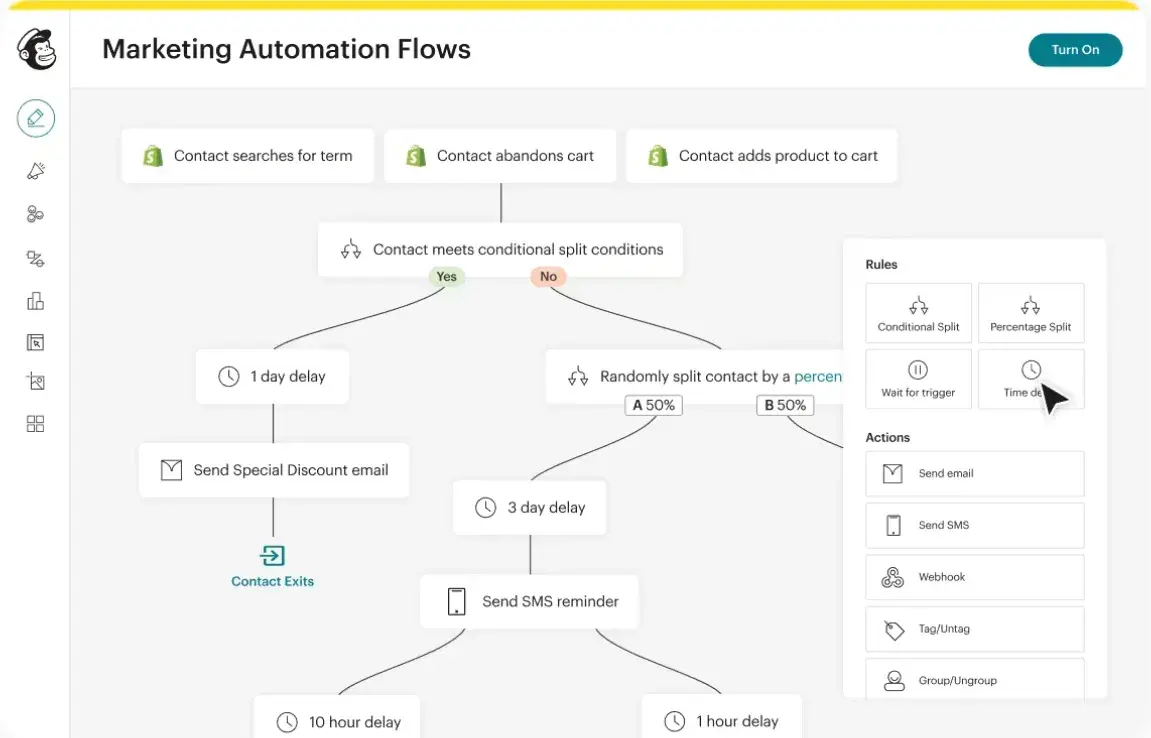
| Mailchimp | Small teams, early-stage companies | Email, automation, audience management | Basic integrations | Free tier; Paid from $13/mo | Not built for complex B2B demand gen |
Identifying the Premier Marketo Alternatives for Diverse Needs
The selection of a Marketo alternative hinges on a team’s specific requirements, including organizational size, existing technology stack, and core use cases. The integration of Artificial Intelligence (AI) features is also becoming a critical differentiator, with capabilities such as predictive scoring, automated content generation, intelligent send-time optimization, data summarization, and advanced analytics insights.
To gain deeper insights into the practical performance of these platforms, industry experts are often consulted. Siddharth Deswal, Founder of Enfra and a seasoned marketing leader with over 14 years of experience across a wide array of marketing automation tools, offers a pragmatic perspective on what these platforms truly deliver.
1. HubSpot Marketing Hub + Smart CRM: The Unified Powerhouse
HubSpot stands out as a comprehensive alternative to Marketo, not solely due to its feature depth but because of its inherently unified architecture. From its inception, HubSpot was designed as an integrated system, eliminating the need for separate CRM and marketing automation platforms and the complex integration layers often required by Marketo. This unified approach fosters a seamless flow of data across marketing, sales, and customer service, eradicating data silos.
Streamlined Marketing Automation
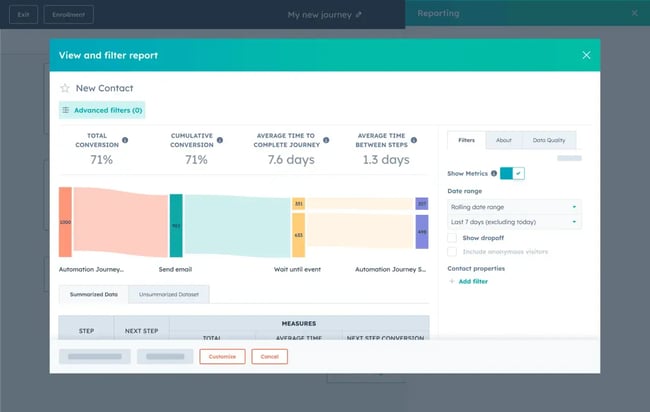
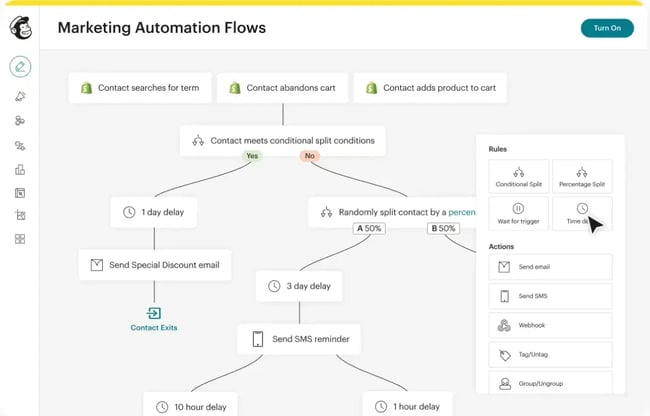
HubSpot’s Marketing Automation leverages an intuitive visual workflow builder that empowers marketing teams to create sophisticated lead nurture sequences, trigger-based campaigns, and multi-step automations with a drag-and-drop interface. This empowers marketers to operate independently, without requiring developer intervention or IT support, a significant departure from the often admin-dependent nature of Marketo’s automation builder.
Ideal for: Demand generation teams seeking enterprise-grade automation capabilities without the associated complexity and administrative burden.
End-to-End Customer Journey Orchestration
The platform’s Customer Journey Orchestration enables end-to-end automation across multiple channels, including email, social media, and direct messaging. Real-time CRM data acts as the trigger for each step, ensuring immediate responsiveness and eliminating the delays associated with data synchronization between disparate systems. When a contact’s status is updated in the CRM, the customer journey dynamically adapts.

Pro Tip: Before migrating from Marketo, meticulously map your existing program logic to HubSpot’s journey framework. The visual canvas facilitates the identification of consolidation opportunities, often leading to a significant simplification of your automation strategy.
AI-Powered Lead Scoring for Precision Targeting
HubSpot’s AI-assisted Lead Scoring system intelligently prioritizes leads based on both their demographic fit and engagement behavior. These scores are directly integrated into the CRM, ensuring that marketing and sales teams operate from a single, unified list of qualified prospects, rather than relying on separate, potentially conflicting, views of the same contacts.
Expert Insight: Lead scoring in Marketo frequently demands extensive configuration and continuous manual adjustments to maintain accuracy. HubSpot’s AI-assisted scoring, conversely, adapts over time, substantially reducing the manual overhead and ensuring sustained relevance.
Advanced Reporting and Revenue Attribution
HubSpot’s Advanced Marketing Reporting provides multi-touch revenue attribution and comprehensive customer journey analytics. This empowers marketing teams to definitively demonstrate the revenue impact of their campaigns without the complex custom reporting setups typically associated with Marketo. With data natively residing within the platform, the need for manual data exports, middleware, and inter-system reconciliation is eliminated.
Ideal for: Revenue teams tasked with proving marketing’s direct contribution to pipeline and closed deals, without the necessity of building custom reporting infrastructure.
The Integrated Marketing Studio
The Marketing Studio consolidates campaign planning, content creation, and execution into a single, AI-powered workspace. For teams accustomed to juggling Marketo with separate content management systems, project management tools, and briefing documentation, this integrated approach significantly reduces coordination overhead and accelerates campaign deployment.
AI-Enhanced Email Personalization
AI-Powered Emails leverage live CRM data to automate personalized 1:1 email content at scale. HubSpot’s AI technology automatically tailors messages for each individual contact, circumventing the manual segmentation and token-building processes often required in Marketo.
Unified Contact Management and Smart CRM
The Contact Management feature meticulously records every interaction – from emails and form submissions to page visits and campaign responses – within a singular, unified contact record. This ensures that both marketing and sales teams have complete context without the need to switch between tools or export data. Reporting Dashboards provide real-time visibility into campaign performance and pipeline contribution, a level of insight that often requires expensive add-ons in Marketo.
Pricing: HubSpot Marketing Hub offers a free edition. Professional plans commence at $800 per month, with pricing scaling based on contact volume and feature sets. The all-in cost of HubSpot, including its integrated CRM, is generally considerably lower than Marketo’s total cost of ownership when implementation, administrative resources, and integration expenses are factored in.
Expert Endorsement: Siddharth Deswal, a long-time HubSpot user since 2013, praises it as his preferred Marketo alternative, citing its "Simplicity, power, and great design all in one package." He notes that while it represents an investment, "it’s well worth the price when you’re a modern brand running sophisticated email campaigns that are based on customer actions, and a list of one."
2. Salesforce Marketing Cloud Account Engagement (Pardot): A Natural Fit for Salesforce Users
For organizations deeply embedded within the Salesforce ecosystem, Marketing Cloud Account Engagement (formerly Pardot) emerges as a strong contender. Its native integration with Salesforce CRM ensures a fluid exchange of contact records, opportunity data, and engagement history, eliminating the need for complex synchronization layers.
Key Features:
- Lead Scoring and Engagement Programs: Robust capabilities for scoring leads based on their engagement and fit.
- Salesforce-Native Sync: Seamless data flow with Salesforce CRM.
- Account-Based Marketing (ABM) Tools: Features designed to support targeted ABM strategies.
Pricing: The Starter plan begins at $25 per month, with advanced tiers offering more comprehensive features at higher price points.
Expert Insight: "For organizations where Salesforce is the true system of record and the sales team lives entirely in that platform, it reduces friction in the marketing-to-sales handoff considerably," notes one industry observer.
Tradeoff: The primary limitation of Pardot is its strong reliance on the Salesforce ecosystem. If your organization is not a dedicated Salesforce user or is considering a CRM change, Pardot’s value proposition diminishes significantly.
Expert Opinion: Deswal shared his experience, stating, "We used it for a year, and a lot of the intelligence that was there in HubSpot was simply missing. Not just marketers, but even the web developers on my team complained about Pardot because it simply didn’t have the intelligence or capabilities for landing page creation that we had become used to in HubSpot."
3. Oracle Eloqua: Enterprise-Grade Power for Complex Needs
Oracle Eloqua is positioned as a platform comparable to Marketo in terms of enterprise scale and complexity. It excels in supporting highly sophisticated multi-touch marketing programs, global deployments, and advanced ABM strategies. However, it carries a similar implementation and operational cost profile.
Key Features:
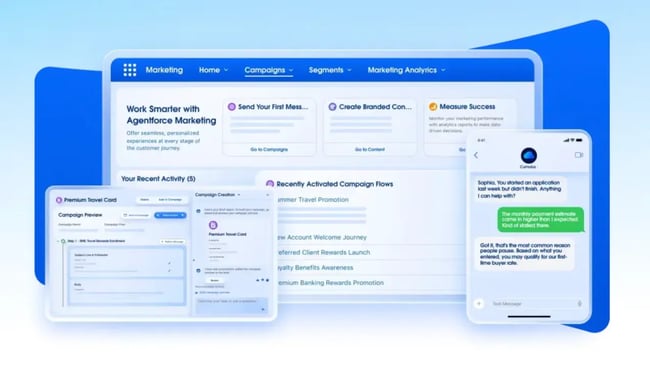
- Advanced Segmentation: Granular control over audience segmentation for targeted campaigns.
- ABM Capabilities: Tools to support account-based marketing initiatives.
- Global Scale: Designed for large, multinational organizations.
Pricing: Oracle Eloqua utilizes custom pricing, typically falling within the mid-to-high enterprise range.
Expert Insight: Eloqua’s data management capabilities are a significant strength, particularly for organizations with complex contact databases and stringent data hygiene requirements. Its built-in deduplication and normalization tools can alleviate a considerable operational burden.
Tradeoff: The implementation complexity and cost profile of Eloqua are akin to Marketo. Businesses considering Eloqua as a Marketo alternative should carefully assess whether it truly addresses the underlying issues or simply replaces one complex platform with another.
Expert Opinion: Deswal expressed his view that Eloqua, "was basically an expensive email marketing system with powerful lead management capabilities (de-dupe, etc), but that’s it. It felt like it was best suited for large B2C like Insurance who struggled with bad or duplicate data on an enormous scale. It wasn’t a platform built for the modern marketer."
4. ActiveCampaign: Accessible Automation for Growing Businesses
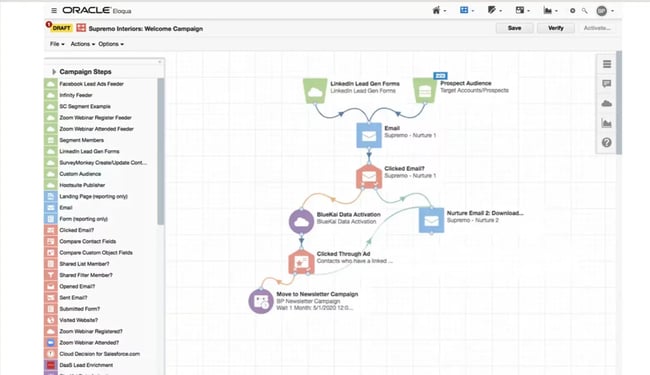
ActiveCampaign targets Small to Medium Businesses (SMBs) and mid-market companies seeking robust email automation and CRM capabilities without the enterprise-level pricing or implementation hurdles. Its automation builder is designed for ease of use, allowing marketers to construct sophisticated sequences without needing constant technical support.
Key Features:
- Email Automation: Powerful tools for creating automated email campaigns.
- Integrated CRM: A built-in CRM for managing customer relationships.
- Segmentation: Flexible options for segmenting audiences.
Pricing: Plans start from $15 per month, with enterprise options available that scale with contact volume.
Expert Insight: ActiveCampaign’s automation builder offers a welcome simplicity for teams transitioning from Marketo who have felt constrained by its complexity. The operational ease it provides can be a significant advantage.
Tradeoff: The reporting and attribution functionalities in ActiveCampaign are generally less advanced than those offered by Marketo or HubSpot. Teams heavily reliant on multi-touch attribution and in-depth revenue analytics may find limitations.
Best for: Growing B2B teams looking to move beyond Marketo’s complexity without overhauling their entire technology stack.
5. Zoho Marketing Automation: A Value-Rich Option within the Zoho Ecosystem
Zoho Marketing Automation is an optimal choice for teams already invested in the Zoho ecosystem, particularly those utilizing Zoho CRM. The native integration between Zoho’s marketing automation and CRM platforms is seamless, and the combined cost of the Zoho suite offers compelling value.
Key Features:
- Email and Landing Pages: Tools for creating and deploying email campaigns and landing pages.
- Lead Scoring: Functionality to score leads based on engagement and fit.
- CRM Integration: Seamless integration with Zoho CRM.
Pricing: Starts at $14 per month.
Expert Insight: Zoho’s comprehensive suite of tools within its ecosystem is a significant advantage. For budget-conscious teams needing to cover marketing automation, CRM, and basic sales functionalities, the Zoho suite provides exceptional value.
Tradeoff: Integration options outside the Zoho ecosystem are more limited. Furthermore, teams accustomed to Marketo’s advanced ABM and enterprise segmentation capabilities may find Zoho Marketing Automation to be less feature-rich in these specific areas.
6. Microsoft Dynamics 365 Marketing: Seamless Integration for Microsoft Environments
For organizations deeply integrated with the Microsoft ecosystem, Microsoft Dynamics 365 Marketing provides native integration with Microsoft 365, Teams, SharePoint, and Power BI. This creates a cohesive and efficient operational environment.
Key Features:
- Event Marketing: Tools to manage and execute event-based marketing campaigns.
- B2B Journeys: Capabilities for designing and automating B2B customer journeys.
- Copilot AI: AI-powered assistance for content generation and campaign optimization.
Pricing: The marketing application starts from $1,700.00 per month, with bundled pricing available across other Dynamics 365 modules.
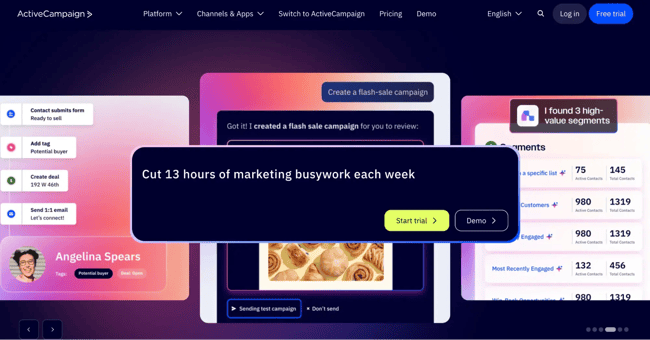
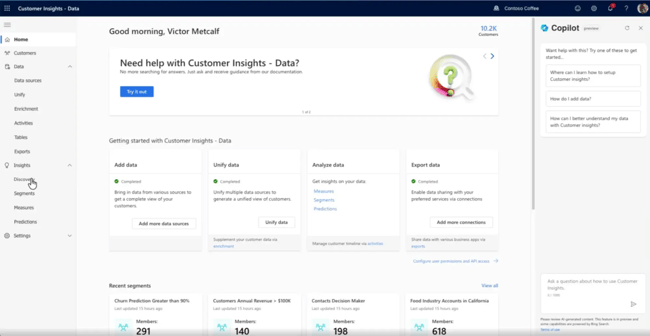
Expert Insight: The integration of Microsoft’s Copilot AI is a notable benefit, offering practical assistance in content creation and campaign optimization. This AI tooling adds tangible value without requiring additional third-party add-ons for organizations already committed to the Microsoft stack.
Tradeoff: Dynamics 365 Marketing’s licensing structure can be intricate, and its implementation often requires significant IT involvement. Businesses not operating within the Microsoft ecosystem should approach this option with careful consideration.
7. Mailchimp: A Starting Point, Not a Replacement
Mailchimp is frequently encountered in initial comparisons of marketing automation tools. While it offers a user-friendly interface and a free tier, it’s crucial to assess its suitability for teams migrating from Marketo. Mailchimp is generally not a direct replacement for sophisticated B2B demand generation needs.
Key Features:
- Email Campaigns: Tools for creating and sending email newsletters.
- Basic Automation: Limited automation capabilities for simple workflows.
- Audience Management: Features for organizing and managing contact lists.
Pricing: A free tier is available, with paid plans starting from $13 per month.
Best for: Small teams and early-stage companies executing straightforward email marketing programs. It is not suitable for teams with complex B2B nurture sequences, ABM requirements, or multi-touch attribution needs.
Pro Tip: For businesses currently using Mailchimp and contemplating a move to a platform like Marketo, it may be more strategic to transition directly to a more robust solution like HubSpot. While migration costs are a factor, avoiding an intermediate step can save time and resources in the long run.
Expert Opinion: Deswal acknowledges Mailchimp’s strengths, noting, "very nice email and newsletter designs out of the box." However, he cautions that it’s "not all that powerful for sophisticated marketing." He adds, "I would easily recommend this to any brand that’s just starting out. It’s perfect for the Small Business with limited needs."
Critical Features to Evaluate When Transitioning from Marketo
When evaluating Marketo alternatives, a rigorous assessment of key features is paramount. This ensures that the chosen platform not only addresses current needs but also provides a foundation for future growth without introducing new capability gaps.
1. Marketing Automation and Workflow Complexity
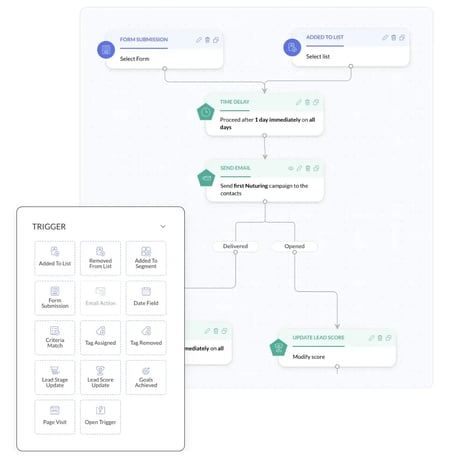
Marketo’s "smart campaigns" and intricate trigger logic are powerful but can be challenging to manage. When assessing alternatives, prioritize mapping your most critical existing programs, including nurture sequences, lead routing workflows, alert triggers, and scoring programs. Request demonstrations from vendors on how they would replicate your three most complex Marketo programs.
2. CRM Integration and Data Unification
Marketo’s integration with CRMs typically involves a synchronization layer, which can introduce data delays and inconsistencies. Evaluate whether potential alternatives offer native CRM functionality or a more tightly integrated model. A unified CRM and marketing platform inherently reduces data silos between marketing, sales, and service, streamlining the revenue process.
3. Lead Scoring and Segmentation Capabilities
Assess how each platform handles demographic fit scoring, behavioral engagement scoring, and score decay. AI-assisted scoring that adapts dynamically can significantly reduce manual maintenance, a crucial consideration for lean operations teams. Evaluate segmentation flexibility: can the platform accommodate your Ideal Customer Profile (ICP) filters, firmographic layering, and persona-based segments without requiring custom coding?
4. Multi-Channel Campaign Execution
Modern B2B marketing strategies often span email, paid advertising, social media, and direct outreach. Determine if each alternative supports your entire channel mix and whether these channels are coordinated within a single workflow or necessitate separate tools and manual handoffs.
5. Revenue Attribution and Reporting Sophistication
Marketo’s reporting often requires significant configuration and may necessitate additional investment for multi-touch attribution analysis. The ideal platform should provide clear answers to funnel conversion rates, campaign ROI, revenue influence, and sales handoff performance. Specifically inquire about:
- Attribution Models: Does it support first-touch, last-touch, and multi-touch attribution models?
- Data Granularity: Can you analyze campaign performance at the individual contact or account level?
- Reporting Customization: How easily can you build custom reports and dashboards to track key performance indicators (KPIs)?
The opportunity cost of relying on inaccurate or incomplete attribution data can be substantial and cumulative.
6. Ease of Migration and Onboarding Support
Successful transitions are built on thorough planning. Inquire about each vendor’s standard migration process. This should include:
- Data Migration Tools and Support: What tools are provided to facilitate data transfer?
- Program Migration Assistance: How are existing Marketo programs mapped and rebuilt?
- Onboarding and Training Resources: What structured training and ongoing support are available?
Charting the Course: Migrating to a Marketo Alternative
The process of migrating from a robust platform like Marketo can seem daunting. However, by breaking it down into a structured sequence of steps, organizations can navigate this transition effectively and minimize disruption.
Step 1: Conduct a Comprehensive Audit of Marketo Usage
Many Marketo instances contain a significant number of unused or legacy programs. Before initiating any migration, meticulously document which programs are actively contributing to business results. This includes identifying active nurture sequences, scoring rules, smart lists, and essential reports. The focus should be on migrating what is actively driving value, rather than a wholesale transfer of all existing assets.
Step 2: Export and Cleanse Your Data
Extract all relevant data, including contacts, lead scores, activity history, and campaign associations. Data cleansing before migration is crucial. Duplicate records and inaccurate information will not improve upon transfer; they will merely propagate issues into the new system.
Step 3: Map Your Integrations
Compile a definitive list of all tools currently integrated with Marketo, such as CRMs, advertising platforms, webinar software, data enrichment vendors, and content management systems. Verify the availability of native integrations for these tools within your target platform before making a commitment. Identifying integration gaps early is far more manageable than addressing them post-migration.
Step 4: Rebuild High-Priority Programs First
Avoid attempting to migrate all programs simultaneously. Prioritize those directly supporting active pipeline generation, such as top-of-funnel nurture sequences, lead routing workflows, and critical sales alert triggers. Focus on getting these essential programs operational in the new platform before addressing lower-priority content.
Step 5: Validate Data Synchronization Before Go-Live
If your chosen platform integrates with a CRM, implement a parallel testing period. This validation phase, typically lasting two to four weeks, is essential for confirming that contact records, scoring data, and campaign associations synchronize correctly. Identifying and rectifying errors before they impact live campaigns is paramount.
Step 6: Plan Your Go-Live Window Strategically
Select a go-live date that avoids periods of peak campaign activity. A mid-quarter switch, for instance, provides your team with sufficient time to stabilize the new platform before entering critical sending windows.
Step 7: Prioritize Team Training
Allocate dedicated, structured training time for your team before the official go-live date. Avoid a "learn-as-you-go" approach. Investing in comprehensive onboarding during the initial four to six weeks post-migration significantly accelerates adoption and minimizes the likelihood of reverting to old workflows.
Frequently Asked Questions About Marketo Alternatives
How Long Does a Marketo Migration Typically Take?
Most migrations from Marketo to another marketing automation platform range from 60 to 180 days. This duration is influenced by factors such as the size of the contact database, the number of active programs to be migrated, and the complexity of existing integrations. Platforms with robust onboarding support, like HubSpot, often enable core migration within 60 to 90 days. Enterprise-level migrations involving intricate CRM synchronization and extensive program libraries may extend to six months.
What Data and Assets Most Commonly Cause Migration Problems?
Common migration challenges include duplicate contact records, inconsistent lead scoring logic that was not adequately documented, nurture programs built on deprecated Marketo features, and CRM field mappings that do not translate cleanly to the new platform. A pre-migration data audit, rather than an in-migration one, is the single most effective step to mitigate downstream issues.
Is Running Marketo and a New Platform in Parallel Advisable?
A brief parallel run, typically two to four weeks, is often recommended for teams with active pipeline programs. This period allows for the validation of data synchronization and builds confidence before a full transition. However, running in parallel for extended periods can create confusion, as teams may be uncertain which system is authoritative for specific data points.
How Can We Estimate Total Cost Beyond Licensing Fees?
The total cost of ownership (TCO) for marketing automation platforms includes:
- Licensing Fees: The core software cost.
- Implementation Services: Costs associated with setup and initial configuration.
- Administrator Time: Ongoing time spent by internal staff managing the platform.
- Training and Upskilling: Costs for educating the team.
- Integration Costs: Expenses for connecting with other systems.
- Add-on Modules: Costs for supplementary features or functionality.
For Marketo, industry estimates often place the all-in annual cost at two to three times the license fee alone. When evaluating alternatives, it’s crucial to request a comprehensive TCO estimate from vendors, not just a per-seat or contact-tier price, and compare it against your current fully loaded Marketo expenditure.
What is the Fundamental Difference Between Marketo and HubSpot?
Marketo operates as a standalone marketing automation platform, necessitating a separate CRM and integration layer to connect marketing and sales data. HubSpot, conversely, is a unified platform where marketing automation and CRM are intrinsically linked, sharing a single contact record. This integrated approach eliminates the data synchronization delays, integration maintenance, and fragmented reporting that many Marketo users encounter. Furthermore, HubSpot typically offers a shorter implementation timeline and lower operational complexity for most organizations.
When is a Unified CRM and Marketing Platform the Optimal Choice?
A unified CRM and marketing platform is the ideal solution when data fragmentation between marketing and sales is creating operational friction. This includes issues such as delayed lead handoffs, inconsistent contact records, or reporting that fails to connect marketing activities directly to revenue outcomes. If your team dedicates significant time to reconciling data between your Marketing Automation Platform (MAP) and CRM, or if you rely on manual data exports and spreadsheets for attribution analysis, a unified platform like HubSpot provides a structural solution to these challenges.
Are There Marketo Alternatives with Robust Event-Based Triggering?
Yes. Platforms like HubSpot, ActiveCampaign, and Pardot all support event-based triggers. These are triggered by specific behavioral actions, such as page visits, form submissions, email clicks, or CRM updates, initiating automation sequences. HubSpot’s real-time CRM data ensures that event triggers are acted upon immediately as a contact’s behavior or status changes, without delays from synchronization cycles. For teams heavily reliant on event-driven logic, evaluating the trigger latency—the speed at which the platform responds to an event—is a critical aspect of the evaluation process.
Selecting the Right Marketo Alternative for Your Team’s Success
The selection of the most suitable Marketo alternative fundamentally depends on addressing your organization’s primary pain points: whether they lie in fragmented data, operational complexity, or prohibitive total cost of ownership. HubSpot’s Marketing Hub and Smart CRM offer a compelling solution by addressing all three within a single, unified platform. Their capabilities, including predictive analytics, multi-touch attribution, and AI-powered features, democratize enterprise-grade marketing technology, making it accessible to teams that may not have the extensive headcount required to manage a highly complex MAP.
Regardless of the platform chosen, certain principles remain constant for a successful transition. Conduct a thorough audit of your current Marketo usage to identify what is truly essential. Prioritize data cleansing before migration. And critically, evaluate alternatives against your actual, current use cases, rather than theoretical scenarios from when your initial Marketo contract was signed. This pragmatic approach ensures that your investment in a new marketing automation platform yields tangible, long-term benefits.
About the Author